Shuffling numbers to the right (or left) without using Excel Offset
Sometimes, quite regularly in fact, you might want to shuffle numbers to the right or left in Excel.
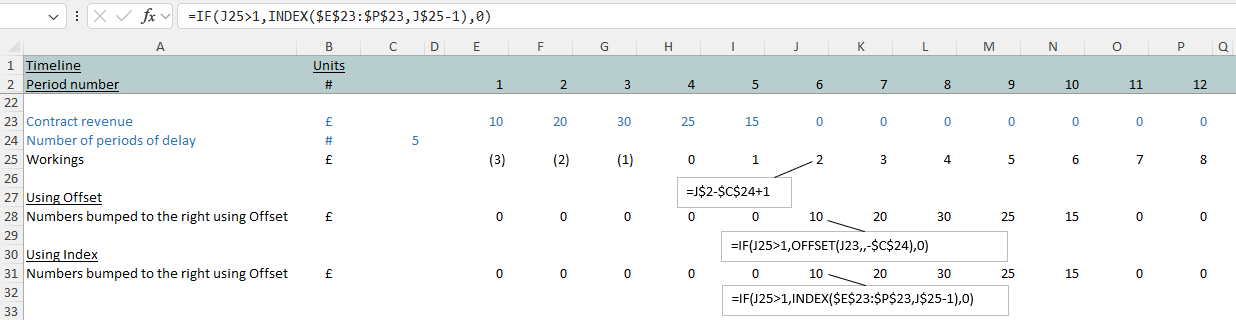
Imagine a contract that’s getting delayed, with all the values pushed out to the right based on a number of months of delay.

Using Offset to bump numbers sideways
Offset might be your go-to function for bumping numbers sideways in Excel. It does what it says on the tin: it will shift your whole set of numbers by the number of columns you point it to.
But if you start to spend time (possibly more time than you ever imagined) in Excel, you’ll notice people start to talk about volatile functions in a way that makes those ones sound kind-of bad. And then, if you do a bit of internet research around Excel’s volatile functions, you’ll probably end up alighting on a list with Offset sitting firmly on it. Volatile functions force Excel to recalculate and use more processing power.
To quote Microsoft’s support documentation: “Excel re-evaluates cells that contain volatile functions, together with all dependents, every time that it recalculates..
And: “Too much reliance on volatile functions can make recalculation times slow.”
We also get: “Use them sparingly”.
Excel's Index function as an alternative to Offset
A carefully-inserted Offset used once or twice in your sub 1MB model is unlikely to make anything fall over. But, if you’re regularly in the habit of building models that are going to slide quite a few numbers to the left or right, and with that model possibly growing arms or legs as the project or transaction evolves, you might want to get into the habit of using something other than Offset to bump your numbers to the left or right.
Here’s a solution that applies the Index function (Index being most pro-modellers’ default solution for picking data out of a table or a list) to slide data.
Sleeping better at night
The resulting formula using Index is slightly longer than the Offset alternative but maybe, in a big model that could grow in the future, it’s going to help make sure you’re not in the habit of sprinkling volatile functions (that even Microsoft reckons sap processing power) liberally throughout your work.
By using an alternative to Offset you might sleep better at night having crossed one thing of the list of things that, potentially, might cause your model to groan under the weight of its own size and fall over.
Staying clear of the habit of using the volatile baddies will, free from worry, mean you can sleep better at night with your Excel-related dreams all that much sweeter!